Most HR problems in a growing company are process problems. Leave gets approved on WhatsApp, attendance lives in one spreadsheet and payroll in another, and nobody is sure who signs off on a transfer. Before you configure any HR software, it helps to draw the process: who starts it, who approves it, what the system should do on its own, and where it ends.
This guide does that for fourteen HR workflows, from raising a vacancy to the final settlement of an exiting employee. Each one is shown as a diagram and mapped to the ERPNext documents that carry it. ERPNext handles HR and payroll through Frappe HR (the HRMS app), and each step below corresponds to a document you can open or an action the system performs.
If you are still deciding on the platform itself, our ERPNext HR & Payroll page lists every feature covered here, our ERPNext implementation page explains how we approach the wider rollout, and our ERP cost guide covers the budget side.
How to Read the Diagrams
Every step is coloured by who does it, so you can see at a glance where work moves between people and the system.
- Employee
- Reporting manager / approver
- HR admin
- ERPNext (automated)
- Finance / accounts
- Statutory authority
Rounded boxes are steps, diamonds are decisions, and ovals are the start and end points. Where a process can loop back (a payroll correction, a rejected expense claim), the arrow returns to the earlier step. Where the text names an ERPNext document, that is the record you would open in the system.
The 14 Workflows at a Glance
| # | Workflow | Main ERPNext documents |
|---|---|---|
| 1 | Manpower Planning and Job Requisition | Staffing Plan, Job Requisition, Job Opening |
| 2 | Recruitment and Selection | Job Applicant, Employee Referral, Interview, Interview Round, Job Offer, Appointment Letter |
| 3 | Employee Onboarding | Employee Onboarding, Employee, Asset, Salary Structure Assignment, Leave Policy Assignment |
| 4 | Attendance and Shift Management | Shift Type, Shift Assignment, Employee Checkin, Attendance, Attendance Request |
| 5 | Leave Management | Leave Type, Leave Policy Assignment, Leave Allocation, Leave Application, Compensatory Leave Request, Leave Encashment |
| 6 | Employee Transfer and Promotion (Multi-Company) | Employee Transfer, Employee Promotion, Salary Structure Assignment |
| 7 | Payroll Processing and Salary Disbursement | Payroll Entry, Salary Slip, Salary Structure, Salary Structure Assignment, Additional Salary, Overtime Slip, Payroll Correction |
| 8 | Statutory Compliance: PF, ESI, PT, LWF, TDS and Gratuity | India Payroll app, Income Tax Slab, Employee Tax Exemption Declaration, Gratuity Rule, Gratuity |
| 9 | Expense Claims and Employee Advances | Employee Advance, Expense Claim, Expense Claim Type, Payment Entry |
| 10 | Employee Loan Management | Loan Type, Loan Application, Loan, Loan Repayment (Frappe Lending) |
| 11 | Performance Appraisal Management | Appraisal Cycle, Appraisal Template, KRA, Goal, Employee Performance Feedback, Appraisal |
| 12 | Training and Development | Training Program, Training Event, Training Result, Training Feedback, Employee Skill Map |
| 13 | Employee Grievance Management | Employee Grievance, Grievance Type |
| 14 | Employee Separation and Full and Final Settlement | Employee Separation, Exit Interview, Full and Final Statement, Asset |
Hire
From an approved vacancy to an active employee.
1. Manpower Planning and Job Requisition
Hiring should start with a headcount check, not a job post. A department head raises the vacancy, HR checks it against the approved Staffing Plan, and anything outside the plan goes to management for budget approval. Only then is a Job Requisition created and routed for approval, and once it clears, HR publishes the Job Opening.
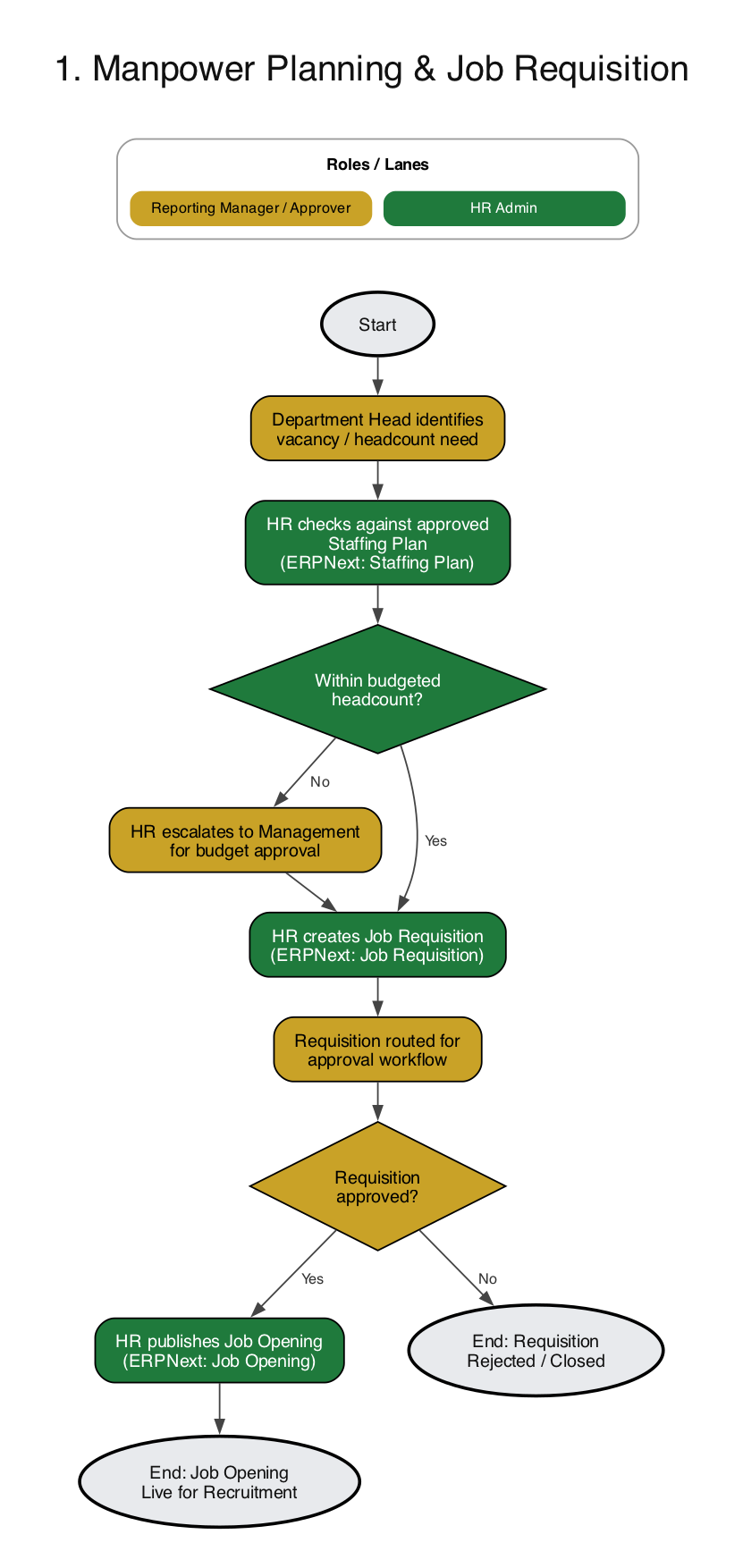
ERPNext documents involved: Staffing Plan, Job Requisition, Job Opening
Worth knowing: A Staffing Plan can cap how many vacancies you are allowed to open for a designation, so an over-budget hire is stopped here rather than discovered at the offer stage.
2. Recruitment and Selection
Candidates arrive through the job portal or as employee referrals. HR screens them against the role, schedules interview rounds, and the panel records feedback for each round. A selected candidate gets a Job Offer, and once they accept, HR generates the Appointment Letter. If the applicant came through a referral, the referral bonus is flagged for payout.
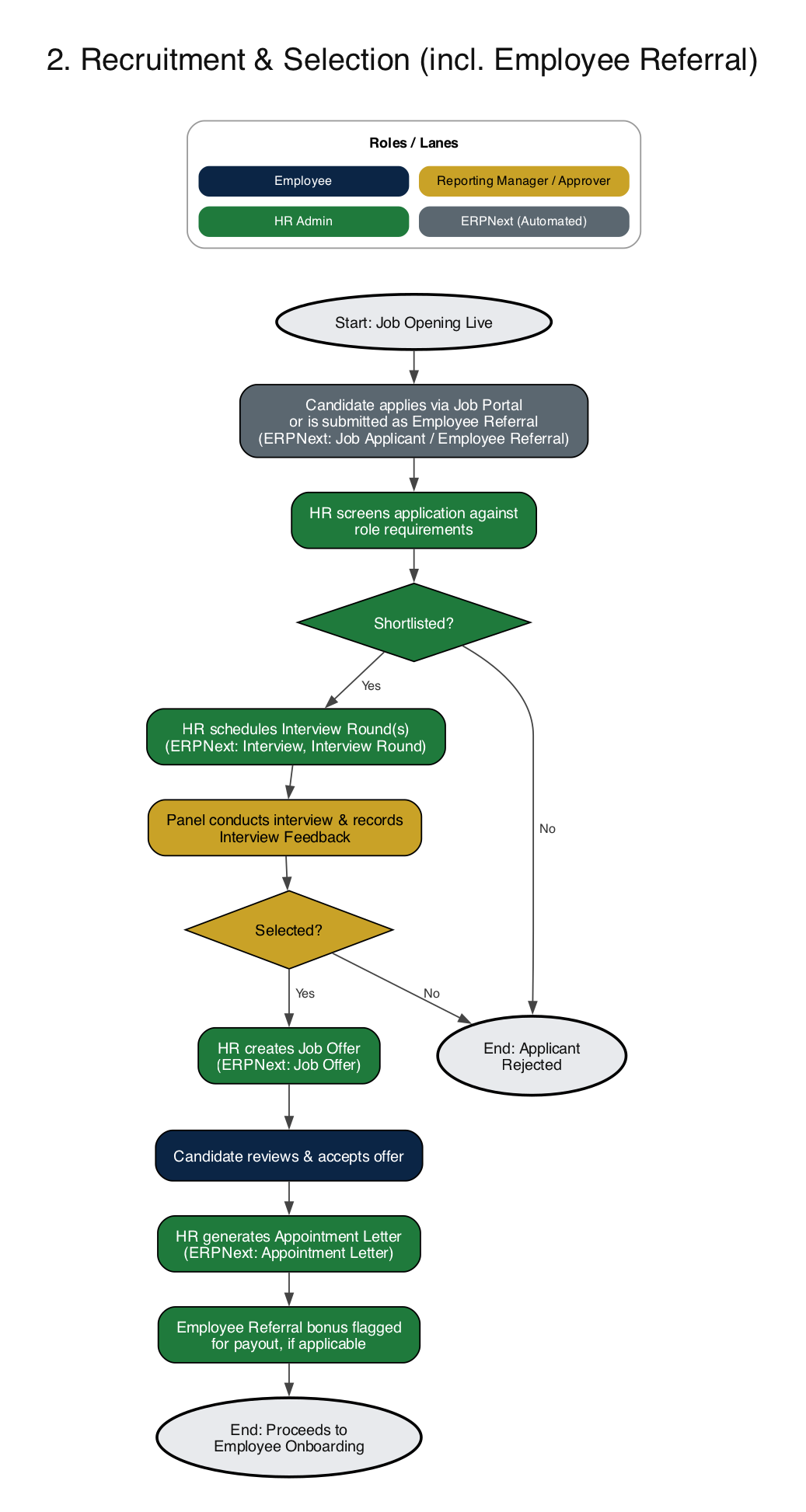
ERPNext documents involved: Job Applicant, Employee Referral, Interview, Interview Round, Job Offer, Appointment Letter
Worth knowing: Set up Interview Rounds once per role type, with the expected skills and the interviewers, and reuse them. Feedback then stays comparable from one candidate to the next.
3. Employee Onboarding
Onboarding turns an accepted offer into an active employee. HR creates the onboarding record with its activity checklist, the new joiner submits documents, and HR verifies them and creates the Employee master. Company, department, designation and branch are mapped, assets like a laptop or ID card are allocated, and salary and leave policies are assigned. The last step is a system login with self-service access.
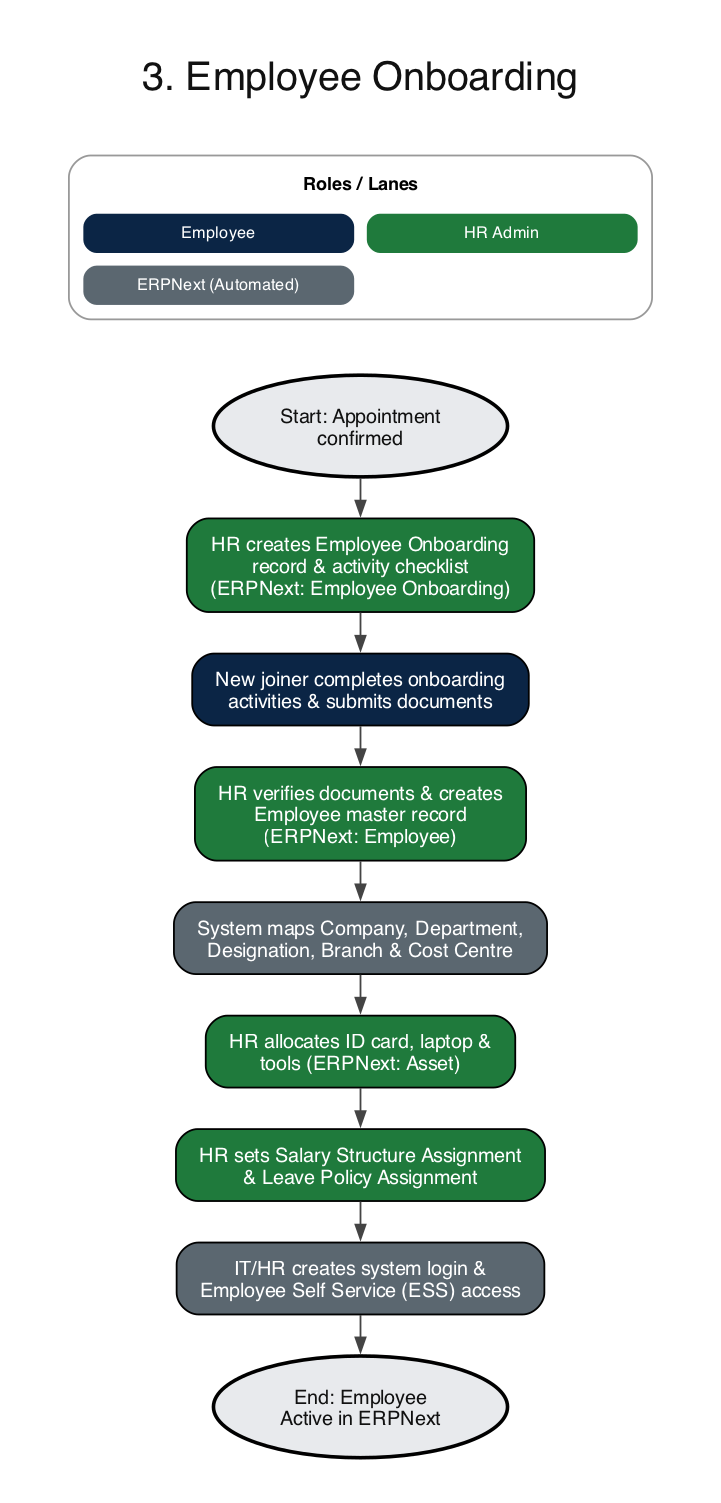
ERPNext documents involved: Employee Onboarding, Employee, Asset, Salary Structure Assignment, Leave Policy Assignment
Worth knowing: Keep a separate Employee Onboarding Template for each department. A sales hire and a plant operator need different checklists, and templates stop tasks from being forgotten.
Want these flows configured in your ERPNext instead of drawn on paper?
Talk to our ERPNext teamTrack time and movement
Attendance, leave and internal moves that feed payroll.
4. Attendance and Shift Management
HR publishes the shift roster, and employees check in and out through a biometric device or the mobile app. Based on the Shift Type rules, the system marks daily Attendance on its own. When there is a discrepancy such as a late arrival, a missed punch or an absence, the employee raises an Attendance Request, the reporting manager approves or rejects it, and the record is corrected. At month end HR finalises attendance for the payroll cycle.
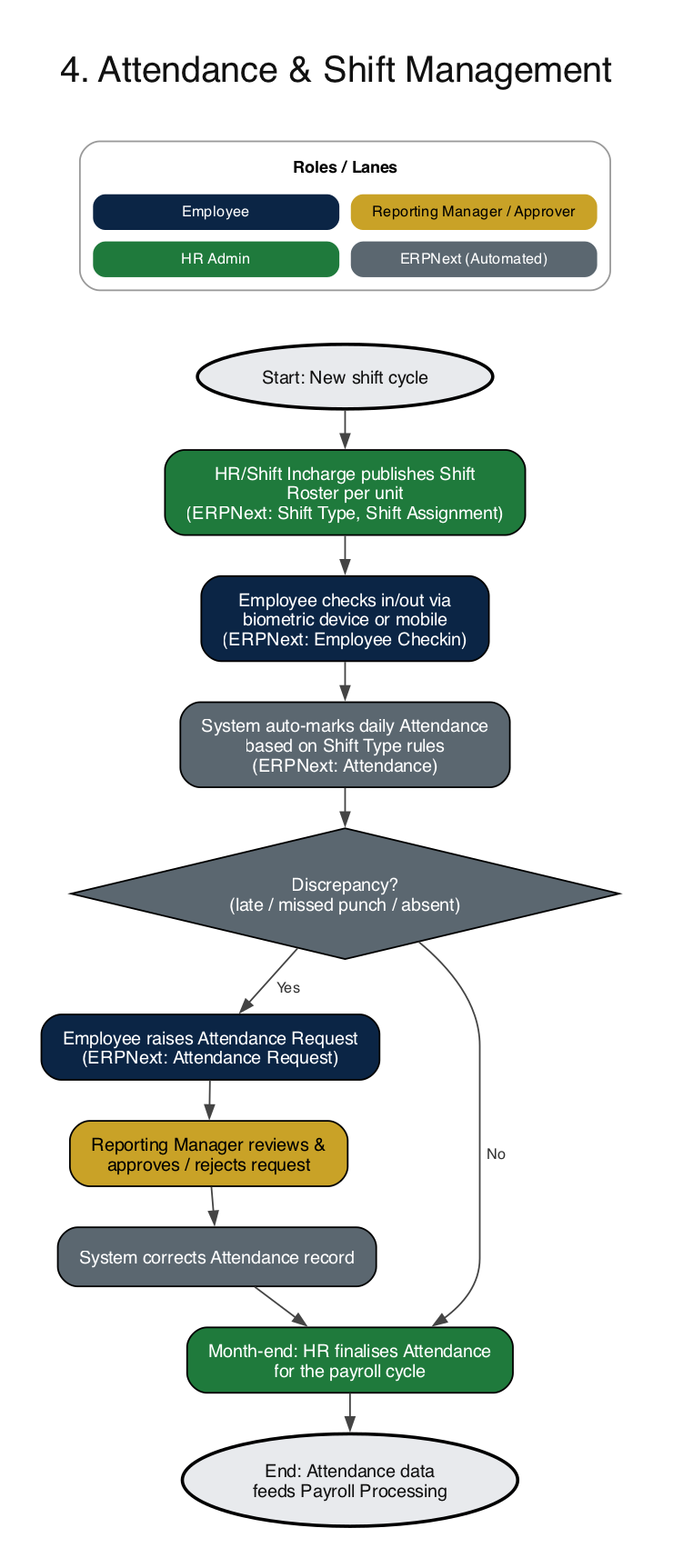
ERPNext documents involved: Shift Type, Shift Assignment, Employee Checkin, Attendance, Attendance Request
Worth knowing: Most attendance disputes come from unclear shift rules. Put grace periods, half-day thresholds and auto-attendance in the Shift Type so they are applied the same way to everyone.
5. Leave Management
At the start of the leave year HR configures Leave Types and Leave Policies and assigns them to employees. An employee applies through self-service, the system checks the balance and policy rules, and the reporting manager approves or rejects. Approved leave updates the Leave Ledger and Attendance. Employees can also apply for compensatory leave or leave encashment where the policy allows it.
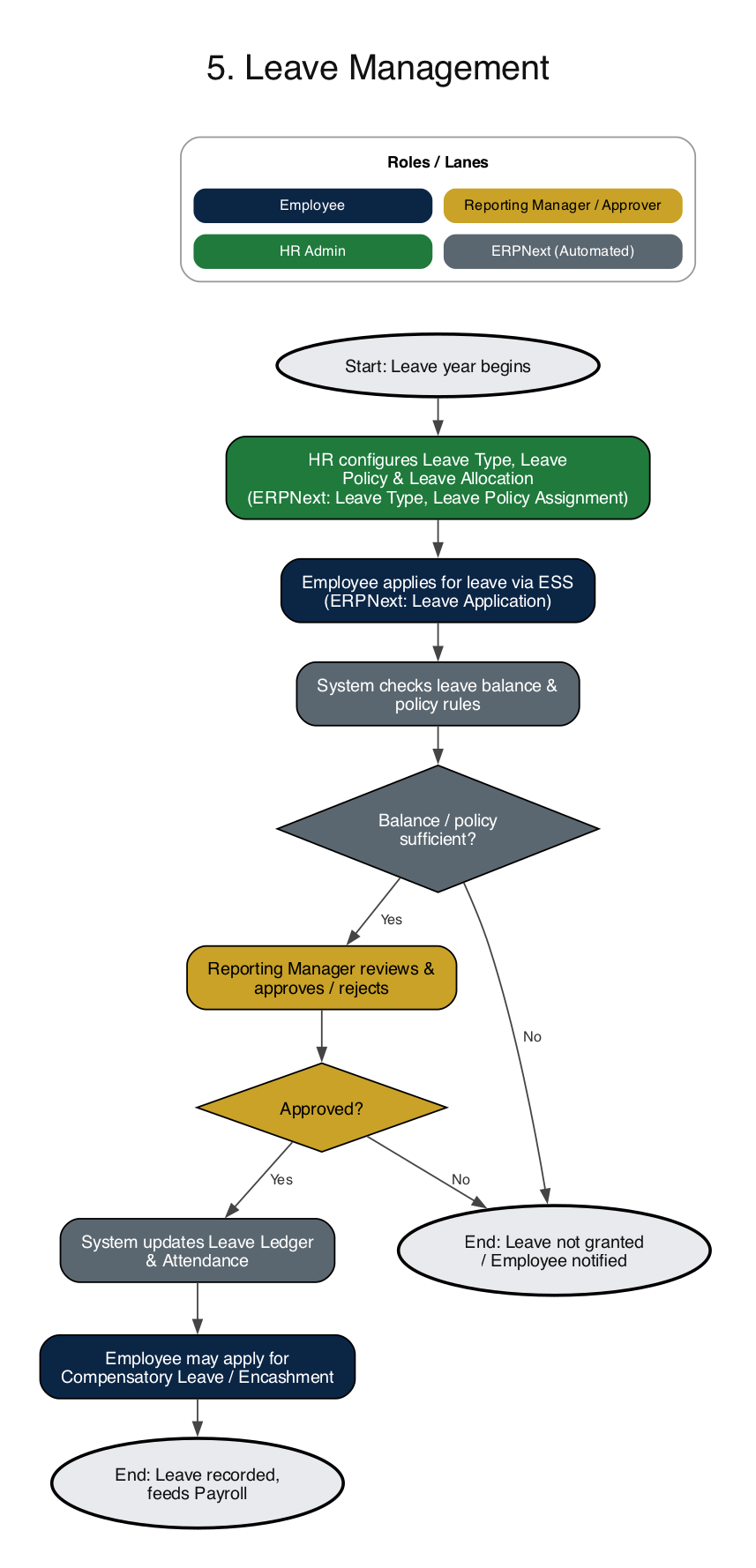
ERPNext documents involved: Leave Type, Leave Policy Assignment, Leave Allocation, Leave Application, Compensatory Leave Request, Leave Encashment
Worth knowing: Set the leave approver on each Employee record and keep the Holiday List current. Balance checks and half-day handling only work if those two are right.
6. Employee Transfer and Promotion (Multi-Company)
A manager or HR identifies the need for a transfer or promotion, and HR creates the Employee Transfer or Employee Promotion record. If the move is between companies in the same ERPNext setup, the system re-maps company, cost centre, department and designation. If it is within one company, department, designation or grade is updated. After approval, the employee record and Salary Structure Assignment are updated and HR informs payroll and issues the letter.
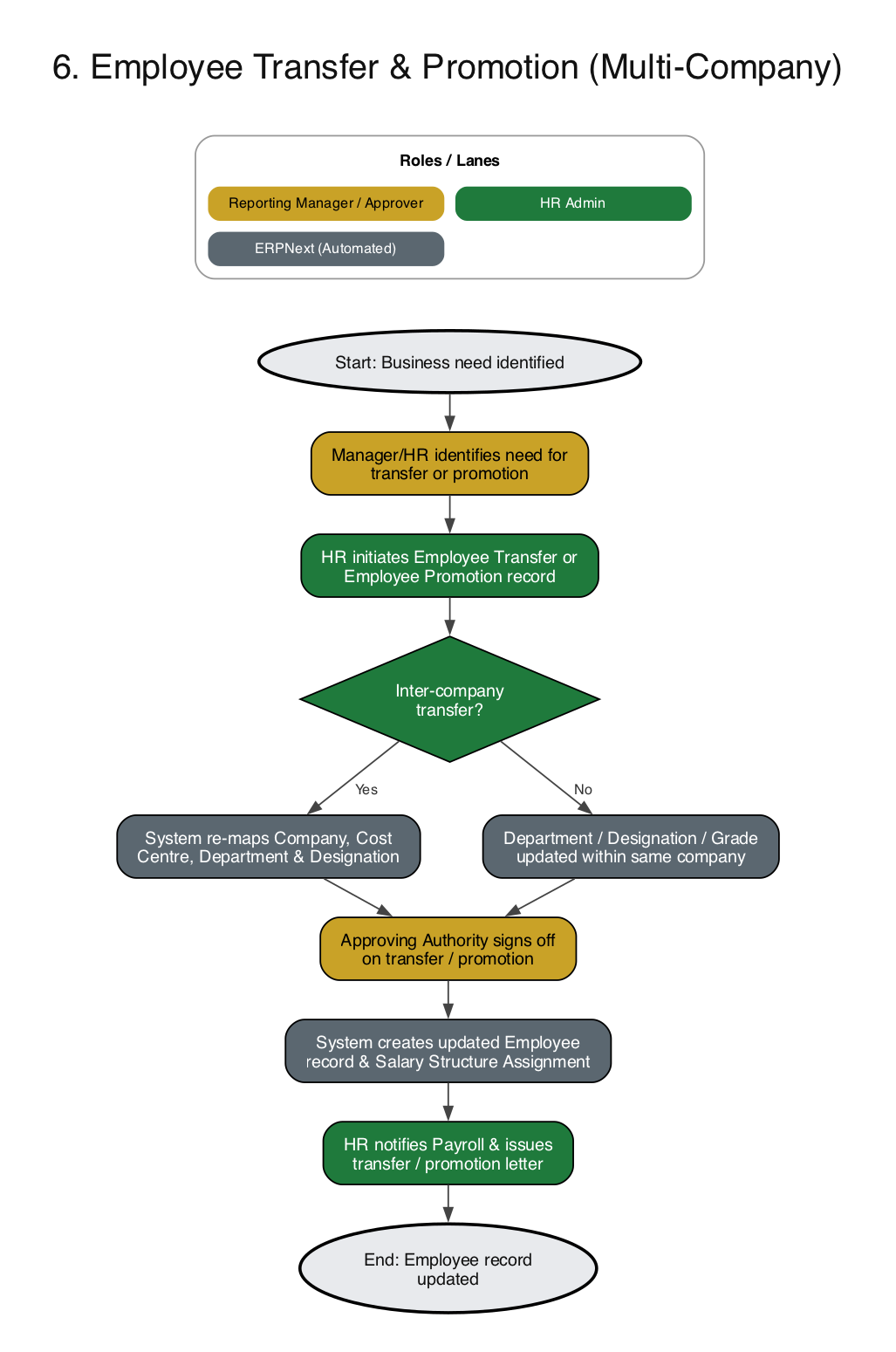
ERPNext documents involved: Employee Transfer, Employee Promotion, Salary Structure Assignment
Worth knowing: Record transfers and promotions with an effective date, and create the new Salary Structure Assignment from the same date. That keeps payroll correct in the month the change happens.
Pay and comply
Salary, statutory filings, expenses and loans.
7. Payroll Processing and Salary Disbursement
Payroll is where attendance, leave and salary structures meet. The system pulls attendance and leave for the period, HR creates a Payroll Entry for the company, and Salary Slips are generated for every employee with a Salary Structure Assignment. Overtime slips, incentives and other Additional Salary components are applied. HR reviews the result, corrects anything wrong (for example loss-of-pay days) and regenerates. Once the approver signs off, the slips are submitted, the payroll accrual entry is posted, and Finance makes the Bank Entry to pay salaries. Employees see their slips in self-service.
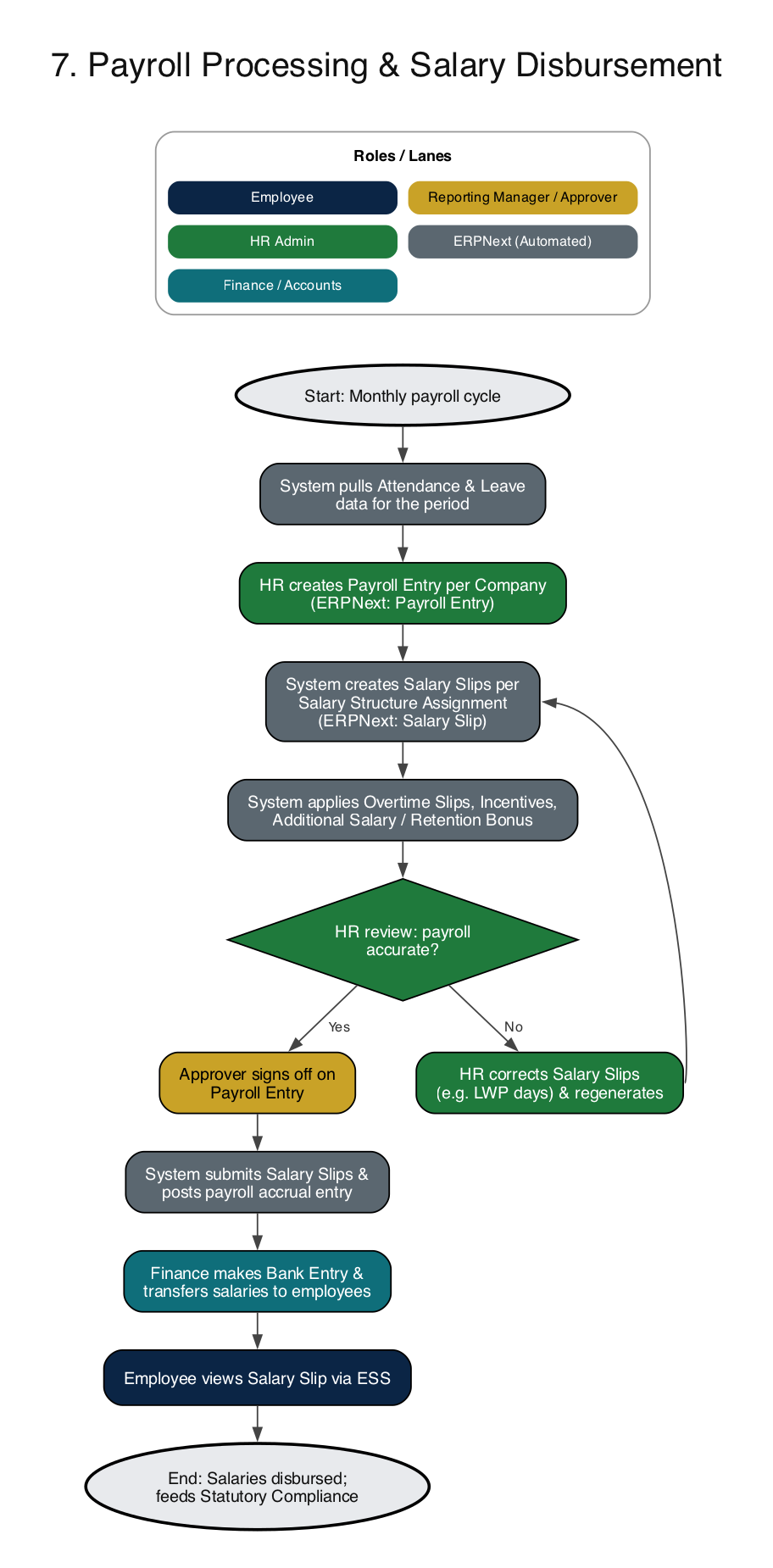
ERPNext documents involved: Payroll Entry, Salary Slip, Salary Structure, Salary Structure Assignment, Additional Salary, Overtime Slip, Payroll Correction
Worth knowing: Run a dry payroll for one department a week before the first real run. The review loop in the diagram (correct, regenerate, review again) is much cheaper to learn on test data.
8. Statutory Compliance: PF, ESI, PT, LWF, TDS and Gratuity
After payroll is submitted, statutory deductions have to be applied, reported and paid on time. With the India Payroll app, the system applies PF, ESI, Professional Tax and Labour Welfare Fund deductions in the Salary Slip and generates the reports HR needs, such as the EPF ECR. Finance or HR remits the amounts to EPFO, ESIC and the state authorities before the due dates. TDS is computed from the employee's Income Tax Slab and tax declarations, HR prepares Form 16 at year end, and gratuity accrual is computed under the Gratuity Rule for eligible staff.
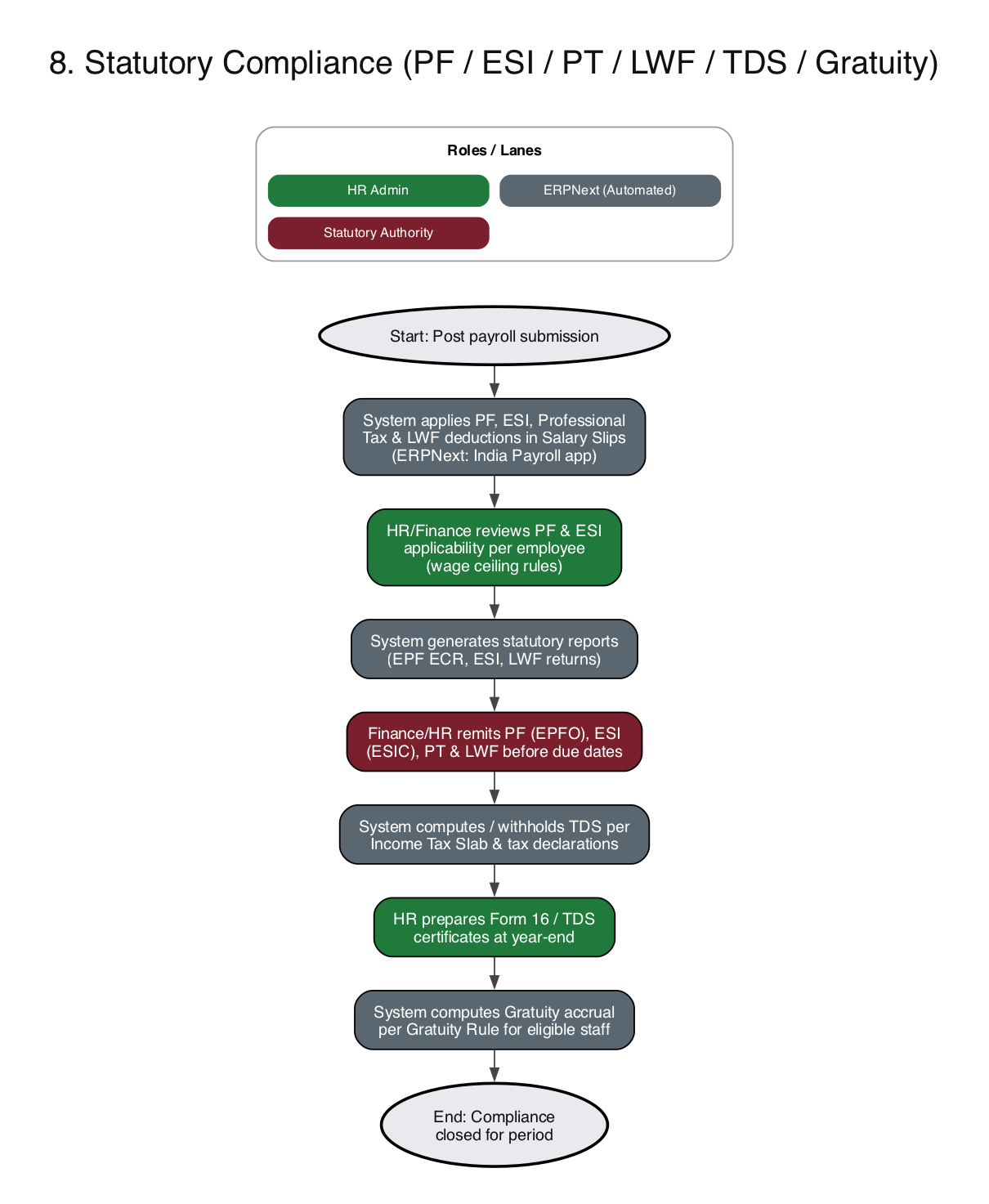
ERPNext documents involved: India Payroll app, Income Tax Slab, Employee Tax Exemption Declaration, Gratuity Rule, Gratuity
Worth knowing: Statutory rates, wage ceilings and due dates change. Confirm the setup against current rules with your accountant or compliance consultant before go-live, and again after each annual update.
9. Expense Claims and Employee Advances
An employee may request an advance before an expense is incurred. The manager approves it and Finance pays it out. Later the employee submits an Expense Claim with bills. If it is within policy, the manager approves; if not, it goes back to the employee for correction. The system nets the claim against any advance and works out what is payable or recoverable, and Finance settles it through a Payment Entry that posts to the accounts.
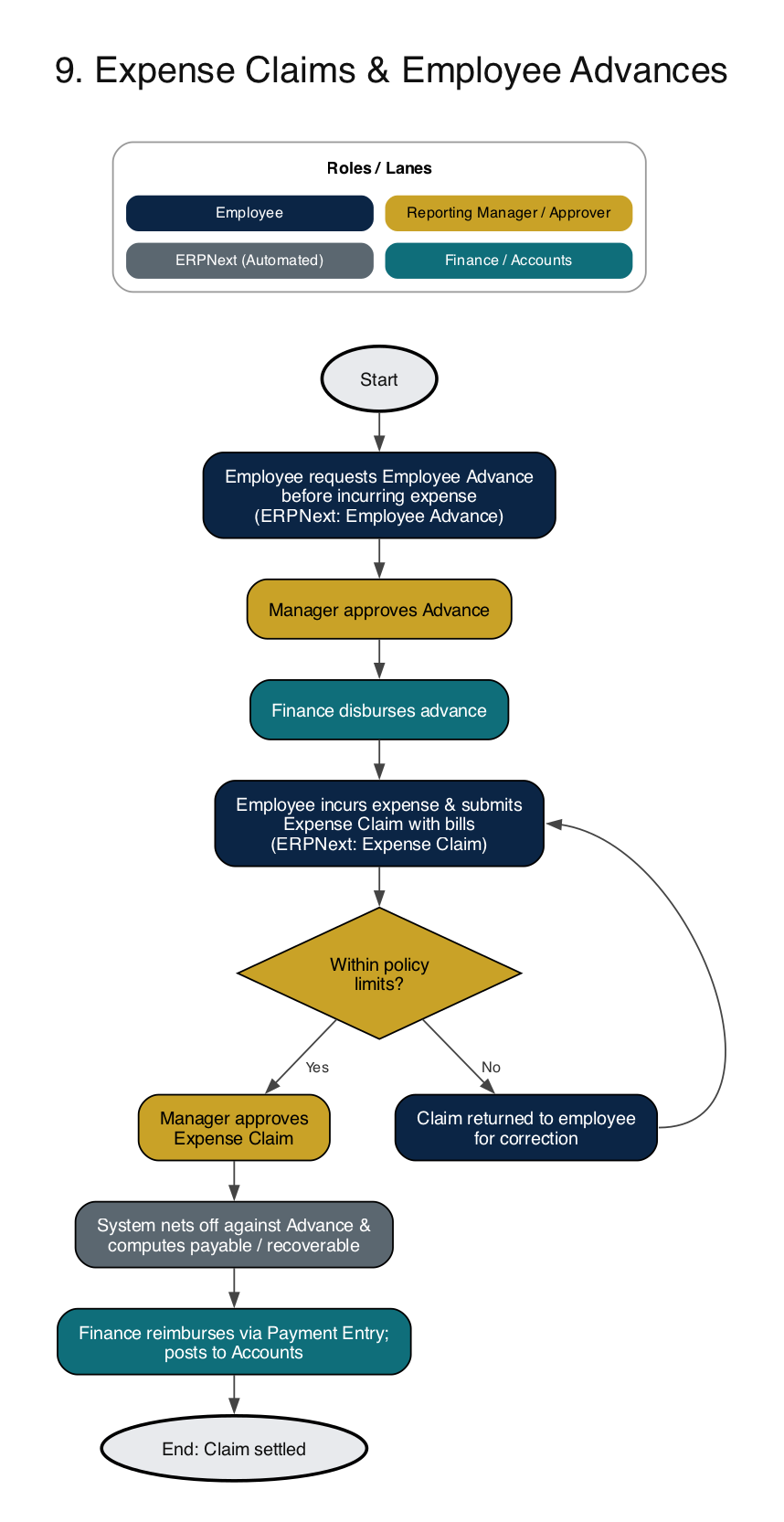
ERPNext documents involved: Employee Advance, Expense Claim, Expense Claim Type, Payment Entry
Worth knowing: Because claims post to Accounts, set a default expense account on each Expense Claim Type. It saves Finance from re-coding claims by hand every month.
10. Employee Loan Management
Staff loans and salary advances follow their own cycle. The employee applies, HR or the manager checks eligibility against the Loan Type policy, and an approved loan is sanctioned and disbursed. The system schedules the EMI, and every month the deduction is taken automatically during the payroll run until the loan is repaid or foreclosed. Employee loans run on Frappe Lending, a separate app that works with HRMS.
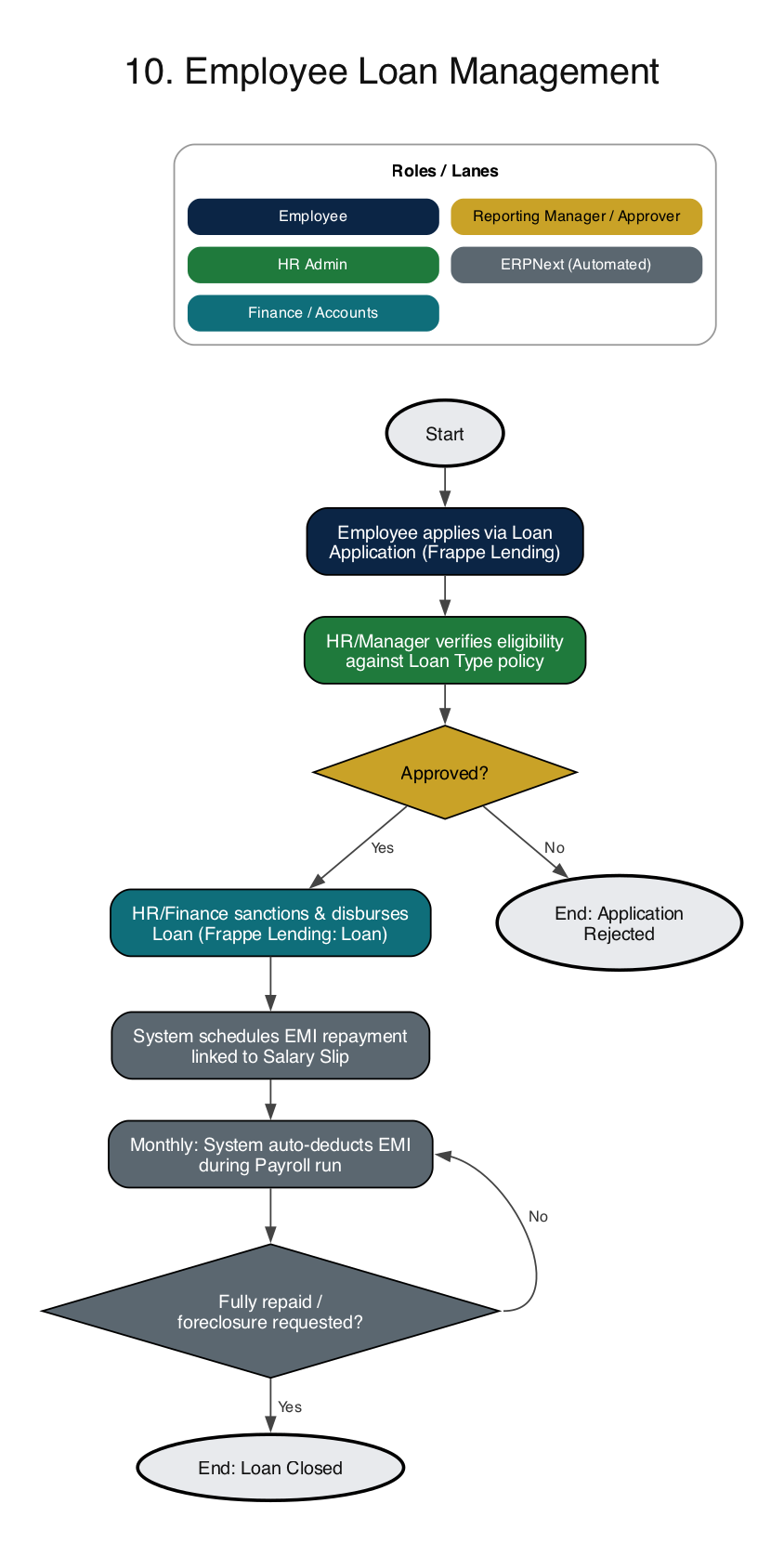
ERPNext documents involved: Loan Type, Loan Application, Loan, Loan Repayment (Frappe Lending)
Worth knowing: Use the option to repay from salary so the EMI appears in the Salary Slip. Otherwise Finance ends up tracking repayments in a spreadsheet outside the system.
Develop
Appraisals, training and grievances.
11. Performance Appraisal Management
HR sets up the Appraisal Cycle and an Appraisal Template with KRAs. Employees set goals aligned to those KRAs and managers review them. During the cycle, managers record performance feedback. At the end, the employee completes a self-appraisal and the manager gives the final rating. HR normalises ratings across departments and communicates the outcome, which feeds increment and promotion decisions.
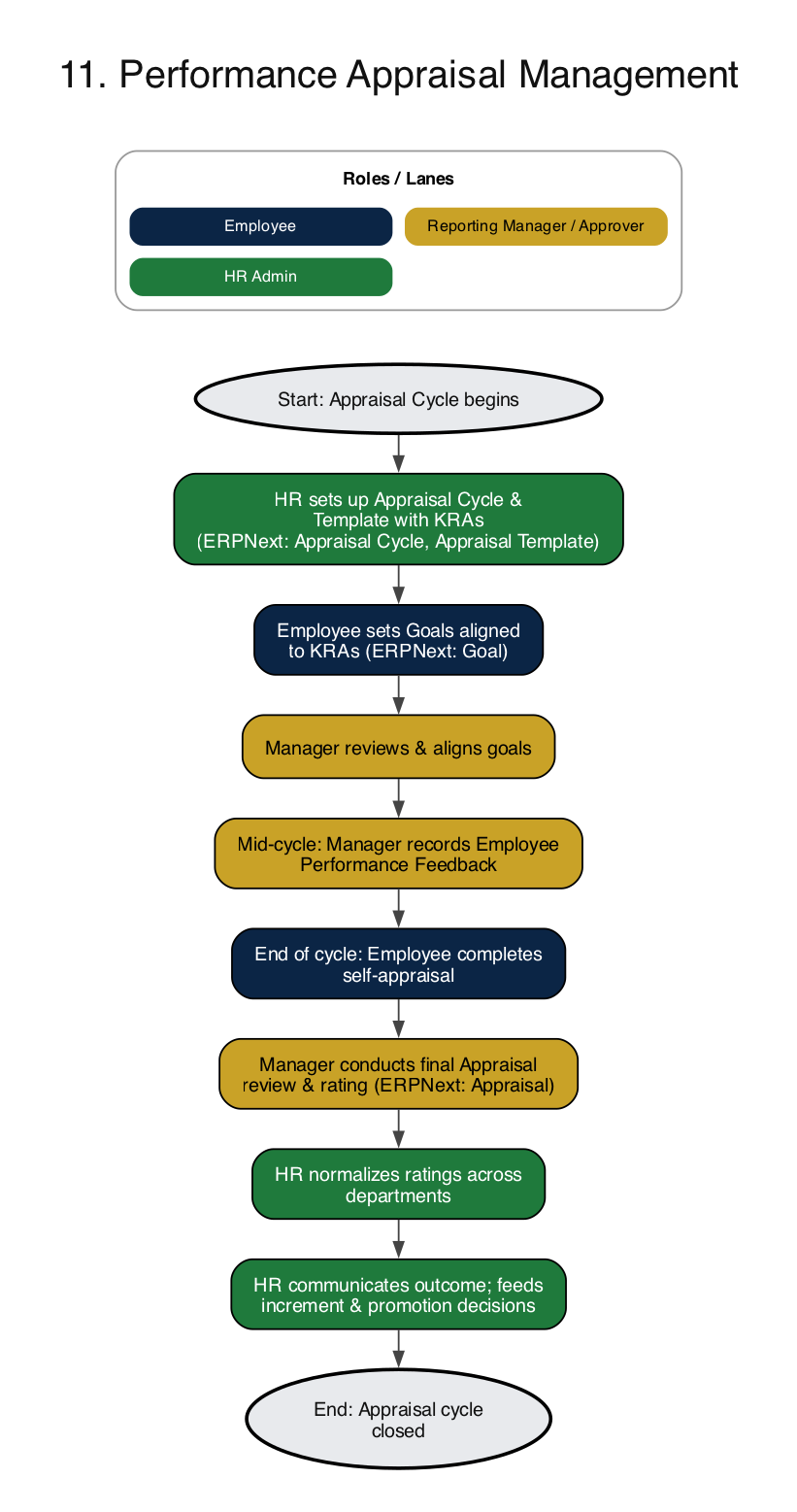
ERPNext documents involved: Appraisal Cycle, Appraisal Template, KRA, Goal, Employee Performance Feedback, Appraisal
Worth knowing: Record feedback during the year, not only at the end. Appraisals written from a year of notes are more specific and easier to defend than ones written from memory in one afternoon.
12. Training and Development
HR or the department head identifies a training need, either a skill gap or a statutory requirement such as safety training. HR creates a Training Program and schedules a Training Event, employees are nominated, and they attend. The trainer or HR records results and attendance, employees submit feedback, and HR updates the Employee Skill Map so skills are on record.
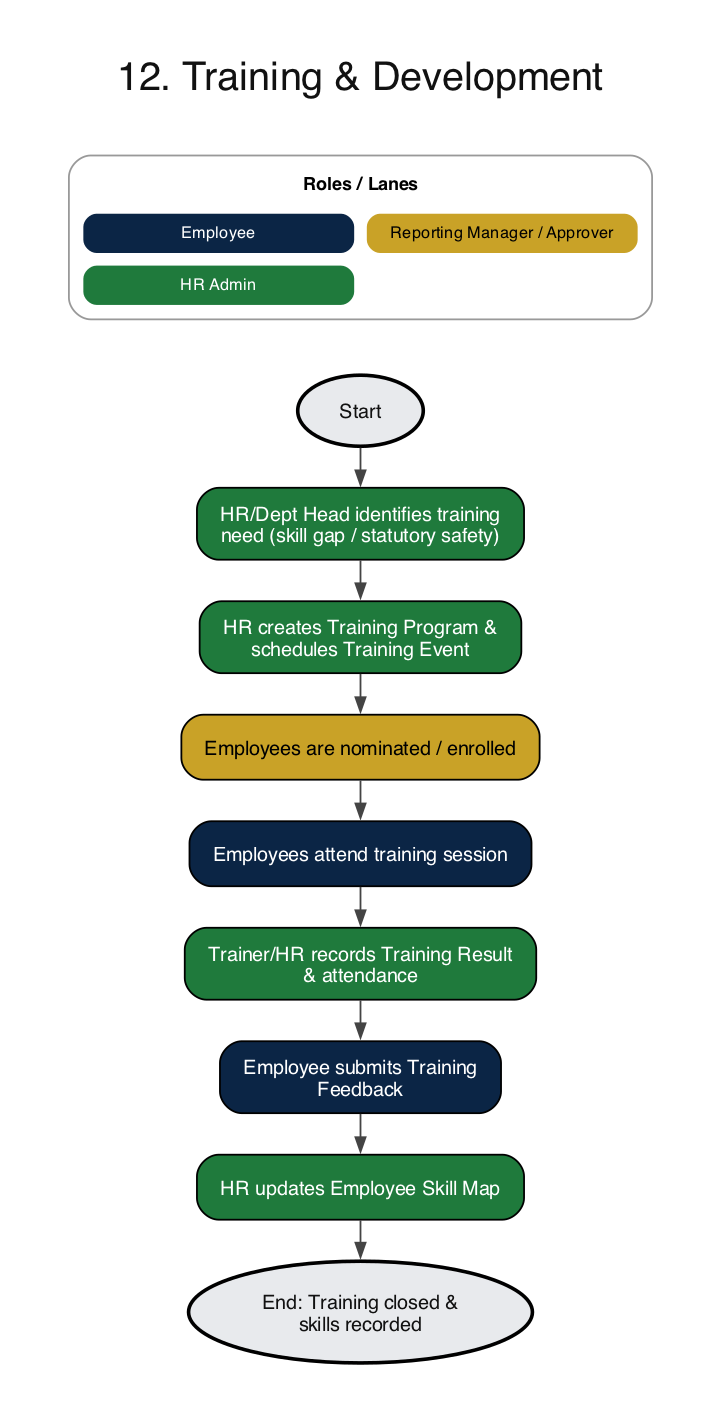
ERPNext documents involved: Training Program, Training Event, Training Result, Training Feedback, Employee Skill Map
Worth knowing: Keep the Skill Map current. When a new project needs a particular skill, HR can look up who already has it before opening a requisition.
13. Employee Grievance Management
An employee raises a grievance in the system and it is assigned to the designated handler or HR. The handler investigates. If it is resolved at the first level, the resolution is recorded and communicated. If not, it is escalated to the next authority or a management committee first. Finally the employee confirms closure or gives feedback.
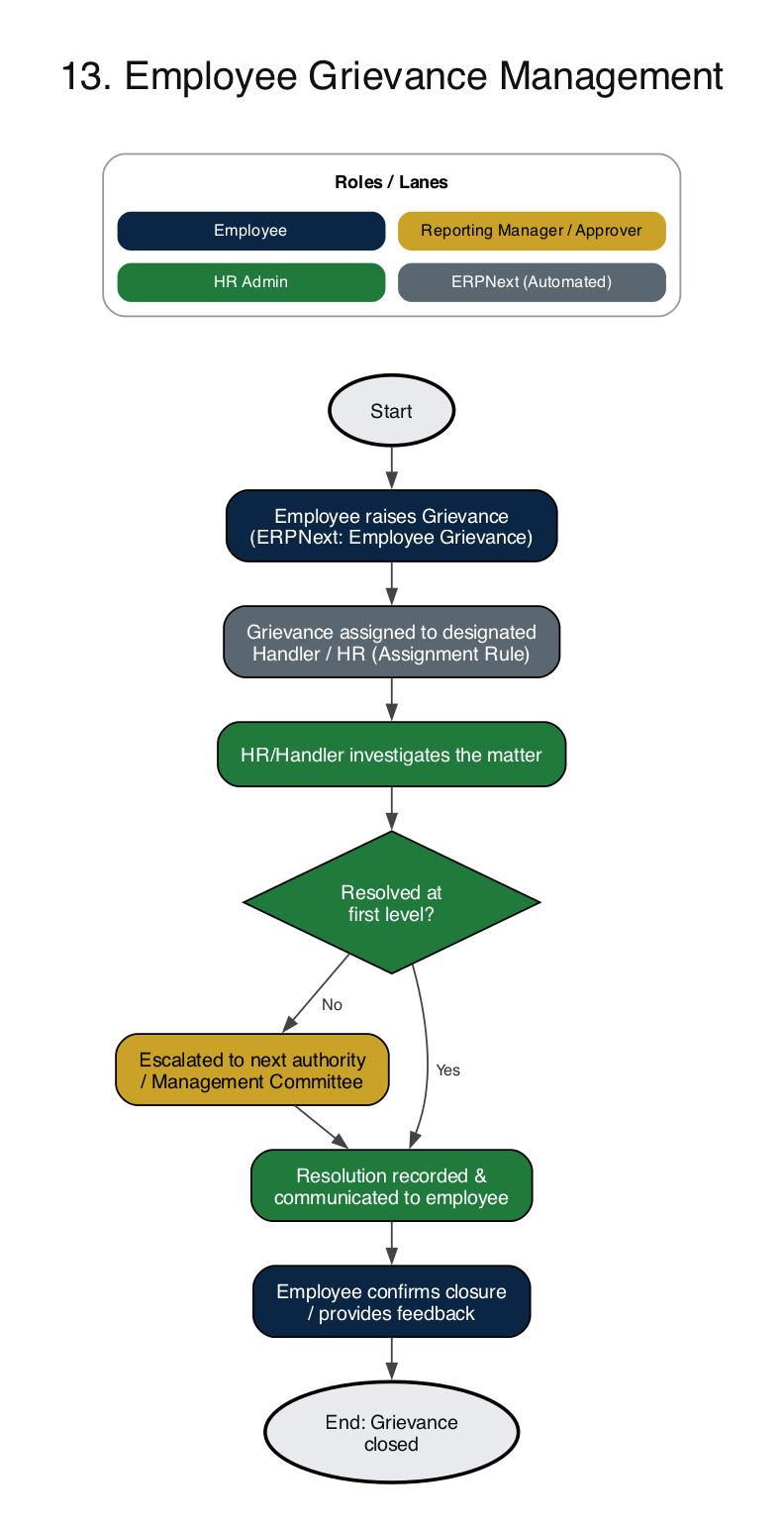
ERPNext documents involved: Employee Grievance, Grievance Type
Worth knowing: Use an assignment rule so every new grievance lands with a named person automatically. The failure to avoid is a grievance that nobody was assigned.
Exit
Separation and final settlement.
14. Employee Separation and Full and Final Settlement
When an employee resigns or the employer initiates separation, the manager or HR confirms the last working day and notice period. HR conducts the exit interview and the employee completes clearance: returning assets and handing over knowledge. If any clearance is pending, the full and final settlement is held. Once everything is cleared, HR computes the Full and Final Statement covering leave encashment, gratuity, dues and recoveries, Finance pays it, and HR marks the employee as Left and turns off system access.
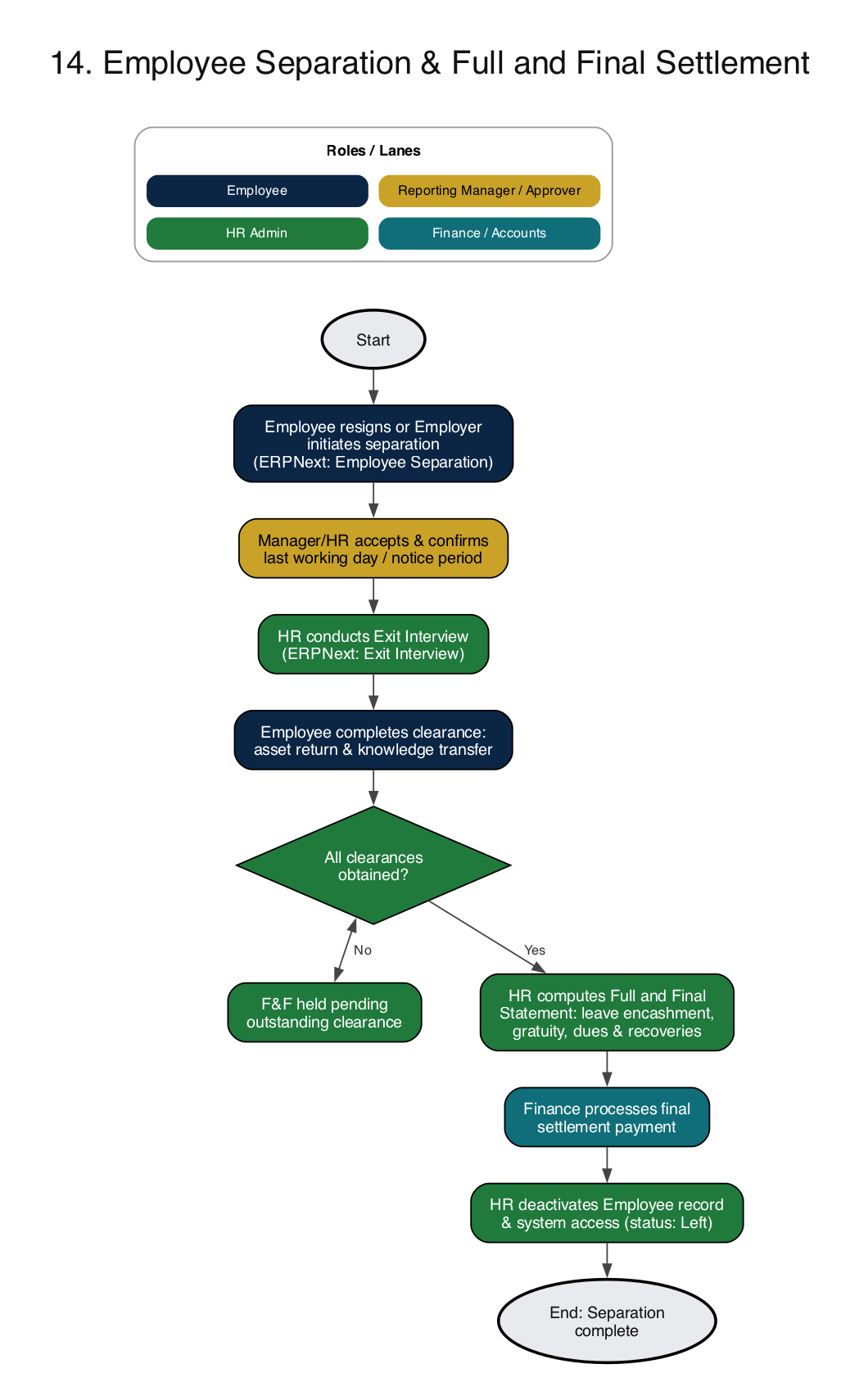
ERPNext documents involved: Employee Separation, Exit Interview, Full and Final Statement, Asset
Worth knowing: Start the separation record on the day the resignation is accepted, not on the last day. The clearance checklist needs the full notice period to be worked through.
How the Workflows Connect
The value of doing HR in one system is that these flows feed each other. Attendance and leave (flows 4 and 5) are the inputs to payroll (flow 7). Payroll feeds statutory compliance (flow 8), and it also picks up loan EMIs (flow 10) and any overtime or incentive components. Onboarding (flow 3) creates the Employee record and salary assignment that everything else depends on, and separation (flow 14) pulls together leave balances, assets and gratuity into one settlement.
Because they all sit on the same Employee record, a change in one place shows up everywhere. A promotion changes the salary structure, so the next Salary Slip is right. An approved leave becomes an Attendance entry, so payroll counts it correctly. And because ERPNext also runs your accounts, payroll and expense claims post to the ledger without a separate import.
Where to Start
You do not need to switch on all fourteen at once. A sensible order for most businesses is:
- Employee master and onboarding (flow 3), so the data is clean.
- Attendance and leave (flows 4 and 5), because payroll depends on them.
- Payroll and statutory compliance (flows 7 and 8). Run two or three cycles in parallel with your current process before switching over.
- Expense claims and loans (flows 9 and 10).
- Recruitment, appraisals, training and the rest as the team gets comfortable.
If you run a factory, shifts and overtime matter more than anywhere else. Our ERPNext for manufacturing page and the guide on how ERPNext transforms manufacturing operations show the production side of the same system.
Continue Reading
- ERPNext Payroll for India: PF, ESI, Professional Tax and TDS Setup
- PF Wage Ceiling Raised to ₹25,000: What Changes in ERPNext Payroll
- ERPNext HR & Payroll: Features and Implementation
- ERPNext Implementation Partner in India
- ERPNext Go-Live: How to Ensure a Smooth ERP Implementation
- ERPNext vs Tally: Migration Guide for Indian SMEs
- How to Drive ERP User Adoption in Your Team
Frequently Asked Questions
An HR process flow is a step-by-step diagram of how an HR activity moves from start to finish: who starts it, who approves it, what the system does automatically, and where it ends. Recruitment, leave, payroll and exit are the usual ones. Drawing them out before you configure software shows you where approvals stall and where data gets re-typed.
Yes. ERPNext covers HR and payroll through Frappe HR (the HRMS app), which installs alongside ERPNext. It handles recruitment, onboarding, attendance and shifts, leave, payroll, expense claims, appraisals, training, grievances and employee separation, all connected to the same Employee record and the same accounts.
Yes, with the India-specific payroll extension installed. It adds Provident Fund, ESI, Professional Tax and Labour Welfare Fund deductions to salary slips, generates the EPF ECR and other statutory reports, and works with Income Tax Slabs and employee tax declarations for TDS. Rates and wage ceilings change, so your implementation partner should verify the configuration against current rules before the first live payroll.
Yes. ERPNext stores punches as Employee Checkin records. These can be created by an employee on the mobile app, entered by HR, or pushed in from a biometric device through an integration or API. Shift Type rules then convert the punches into daily Attendance.
Yes. Approval routing can be changed with ERPNext Workflows, custom fields and roles, without touching core code. Most businesses keep the standard flow and adjust who approves what, for example a two-level leave approval for a large plant and single-level for the head office.
Start with the employee master, attendance and leave, then payroll, because payroll depends on both. Recruitment, appraisals and training can follow once monthly payroll runs cleanly for two or three cycles.
Need HR and Payroll Set Up in ERPNext?
We configure these workflows around your actual approval rules and statutory setup, then train your HR team to run them.